
 English
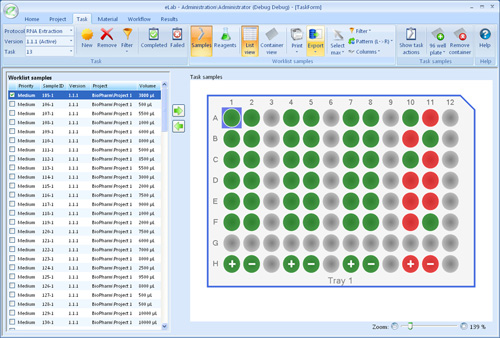
When it's time to do manual work the task screen is the essential resource for rapidly completing assigned activities, providing immediate access to all the information users require.
- Samples selected from a work list or directly assigned to the task can be displayed in a visual representation of their storage containers or in a data centric view.
- Reagents are automatically filtered based on the applying protocol.
- Powerful data manipulation tools allow eLab to present the data in a format that is most relevant to your needs.
- Create and add visual representations of the actual containers that the work will be performed in.
- Manipulate samples as in real life by selecting and dragging them within containers.
- Identify and flag contaminated samples.
- Indicate the success or failure of each sample within a task.
- Rapidly create sample and container labels.
- Print the relevant protocols or proformas.
- Export data the way you want with a choice of Microsoft Excel, text, CSV, or XML based formats
- Position samples manually or with the assistance of patterns.